
HP Photosmart R507/R607 digital camera with HP Instant Share - User's Manual
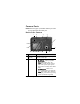
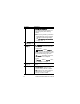
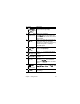
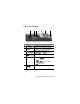
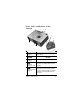
Table Of Contents
- Chapter 1: Getting Started
- Setup
- Camera Parts
- Camera States
- Camera Menus
- Camera Status Screen
- Chapter 2: Taking Pictures and Recording Video Clips
- Chapter 3: Reviewing Images and Video Clips
- Chapter 4: Using HP Instant Share
- Chapter 5: Transferring and Printing Images
- Chapter 6: Using the Setup Menu
- Chapter 7: Troubleshooting and Support
- Appendix A: Managing Batteries
- Appendix B: Purchasing Camera Accessories
- Appendix C: Specifications

Chapter 1: Getting Started 21
Camera Parts
NOTE Refer to the pages in parentheses after the part names
for more information about those parts.
Back of the Camera
# Name Description
1Viewfinder
(page 31)
Allows you to frame the subject of your
pictures or video clips.
2Viewfinder lights
z solid red—Video is recording.
z AF solid green—When you press the
Shutter button halfway down, this
light turns on solid when the camera is
ready to take a picture (auto exposure
and auto focus are locked, and the flash is
ready).
z AF blinking green—Either a focus
warning occurred when you pressed the
Shutter button halfway down, the flash is
still charging, or the camera is processing
a picture (see the following NOTE).
10
4
5
6
7 8
9
11
1
13 12
14
15
2 3