
HP Photosmart R507/R607 digital camera with HP Instant Share - User's Manual
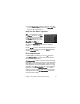
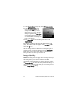
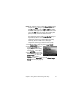
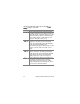
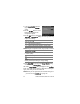
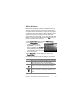
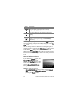
Table Of Contents
- Chapter 1: Getting Started
- Setup
- Camera Parts
- Camera States
- Camera Menus
- Camera Status Screen
- Chapter 2: Taking Pictures and Recording Video Clips
- Chapter 3: Reviewing Images and Video Clips
- Chapter 4: Using HP Instant Share
- Chapter 5: Transferring and Printing Images
- Chapter 6: Using the Setup Menu
- Chapter 7: Troubleshooting and Support
- Appendix A: Managing Batteries
- Appendix B: Purchasing Camera Accessories
- Appendix C: Specifications

56 HP Photosmart R507/R607 User’s Manual
1 In the Image Quality sub-menu
(page 52), select the Custom...
option.
2 Use the buttons to move
between the Resolution and
Compression options.
3 Use the buttons to change the
Resolution or Compression setting. The following tables help
explain these settings.
NOTE At higher compression levels, image quality is reduced.
4 Press Menu/OK to save the custom Image Quality setting
and return to the Capture Menu.
The custom Image Quality setting will appear in the Live View
screen. The custom setting remains in effect until it is changed
again, even when you turn the camera off.
NOTE When you use digital zoom, the resolution changes as
you zoom in. See Digital Zoom on page 40.
Resolution Settings
4MP—Full resolution; therefore, highest quality
2MP—2MP (medium) resolution
VGA—640 by 480 (lowest) resolution; lowest quality
Compression Settings
—Highest compression; most memory-efficient, and
minimum quality
—Medium compression
—Low compression
—Little to no compression; therefore, least
memory-efficient (best setting for image editing)