
HP Photosmart R507/R607 digital camera with HP Instant Share - User's Manual
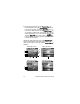
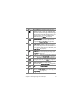
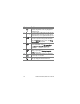
Table Of Contents
- Chapter 1: Getting Started
- Setup
- Camera Parts
- Camera States
- Camera Menus
- Camera Status Screen
- Chapter 2: Taking Pictures and Recording Video Clips
- Chapter 3: Reviewing Images and Video Clips
- Chapter 4: Using HP Instant Share
- Chapter 5: Transferring and Printing Images
- Chapter 6: Using the Setup Menu
- Chapter 7: Troubleshooting and Support
- Appendix A: Managing Batteries
- Appendix B: Purchasing Camera Accessories
- Appendix C: Specifications

76 HP Photosmart R507/R607 User’s Manual
5 Use one of several ways to exit the Playback Menu. If,
immediately after entering the Playback Menu, you decide
not to change anything, simply press Menu/OK again to
exit the menu. After you have used the Playback Menu, you
can navigate to another menu via the menu tabs at the top
of the Image Display. You can also select the Exit option
and press Menu/OK. If you want to return to Playback, or
switch to another camera state, press the appropriate button
on the back of the camera.
The following table summarizes each of the Playback Menu
options and describes the information in the bottom right
corner of each image or video clip while the Playback Menu is
displayed.
Still Image Screen 1: Video Clip Screen 1:
Still Image Screen 2: Video Clip Screen 2:
1
2
3
4
5
6
7
8
9
10 11
15
14
13
12
16