
HP Photosmart R507/R607 digital camera with HP Instant Share - User's Manual
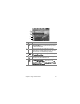

Table Of Contents
- Chapter 1: Getting Started
- Setup
- Camera Parts
- Camera States
- Camera Menus
- Camera Status Screen
- Chapter 2: Taking Pictures and Recording Video Clips
- Chapter 3: Reviewing Images and Video Clips
- Chapter 4: Using HP Instant Share
- Chapter 5: Transferring and Printing Images
- Chapter 6: Using the Setup Menu
- Chapter 7: Troubleshooting and Support
- Appendix A: Managing Batteries
- Appendix B: Purchasing Camera Accessories
- Appendix C: Specifications

Chapter 4: Using HP Instant Share 91
# Icon Description
1 Share All Images... lets you share all still images in
internal memory or on an optional memory card to
the selected destinations.
2 Check mark indicates this destination has been
selected for the currently displayed image. (You can
select more than one destination per image.)
3 E-mail destinations that were set up in this example
HP Instant Share Menu.
4 A website destination that was set up. Other types of
destinations may have different icons.
5 HP Instant Share Setup... lets you add more e-mail
and other HP Instant Share destinations to the
HP
Instant Share
Menu. (See Setting Up the HP Instant
Share Menu on the Camera on page 86.)
1
2
3
4
5