
3Com Switch 4200G Configuration Guide




Telnet Configuration with Authentication Mode Being Scheme 105
Telnet Configuration
with Authentication
Mode Being Scheme
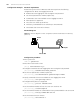
Configuration Procedure
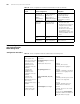
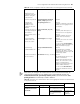
Table 81 Telnet configuration with the authentication mode being scheme
Operation Command Description
Enter system view system-view —
Configure
the
authenticati
on scheme
Enter the
default ISP
domain view
domain system Optional
By default, the local AAA scheme is
applied. If you specify to apply the
local AAA scheme, you need to
perform the configuration
concerning local user as well.
If you specify to apply an existing
scheme by providing the
radius-scheme-name argument,
you need to perform the following
configuration as well:
■ Perform AAA&RADIUS
configuration on the switch.
(Refer to “AAA&RADIUS
Configuration” for more.)
■ Configure the user name and
password accordingly on the
AAA server. (Refer to the user
manual of AAA server.)
Configure the
AAA scheme
to be applied
to the domain
scheme { local |
radius-scheme
radius-scheme-name [
local ] | none }
Quit to system
view
quit
Create a local user and enter
local user view
local-user user-name No local user exists by default.
Set the authentication
password for the local user
password { simple |
cipher } password
Required
Specify the service type for
VTY users
service-type telnet [ level
level ]
Required
Quit to system view quit —
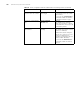
Enter one or more VTY user
interface views
user-interface vty
first-number [ last-number ]
—
Configure to authenticate
users locally or remotely
authentication-mode
scheme
Required
The specified AAA scheme
determines whether to
authenticate users locally or
remotely.
Users are authenticated locally by
default.
Configure the command
level available to users
logging into the user
interface
user privilege level level Optional
By default, commands of level 0 are
available to users logging into the
VTY user interfaces.
Configure the supported
protocol
protocol inbound { all |
ssh | telnet }
Optional
Both Telnet protocol and SSH
protocol are supported by default.
Make terminal services
available
shell Optional
Terminal services are available in all
use interfaces by default.