
3Com Switch 4200G Configuration Guide


210 CHAPTER 26: ACL CONFIGURATION
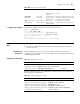
Configuration Example Apply ACL 2100 in the inbound direction on GigabitEthernet 1/0/1 to filter packets.
<S4200G> system-view
[4200G] interface gigabitethernet 1/0/1
[4200G-GigabitEthernet1/0/1] packet-filter inbound ip-group 2100
Displaying and
Debugging ACL
Configuration
After the about-mentioned configuration, you can use the display command in any
view to view the ACL running information, so as to verify configuration result.
The matched information displayed by the display acl command is the matched
information process by the software of the switch. You can use the display
qos-interface traffic-statistic command to view the statistics information of data
forwarded by the hardware of the switch.
ACL Configuration
Examples
Advanced ACL
Configuration Example
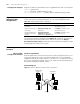
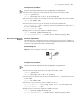
Network requirements
Different departments are interconnected on the intranet through the ports of the
Switch. The wage query server of the financial department is accessed through
GigabitEthernet1/0/1 (the subnet address is 129.110.1.2). It is required that an ACL
be correctly configured to prohibit access to the wage server by other departments
during the working hours (8:00 to 18:00).
Network diagram
Figure 61 Network diagram for advanced ACL configuration
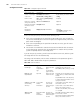
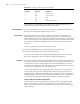
Table 183 Display and debug ACL configuration
Operation Command Description
Display the configured
ACL rule(s)
display acl { all | acl-number } The display command can be
executed in any view
Display a time range or
time ranges
display time-range { all |
time-name }
The display command can be
executed in any view
Display the application
information of packet
filtering
display packet-filter
{ interface interface-type
interface-num | unitid unit-id }
The display command can be
executed in any view
Administrative Dept
Financial Dept
President's office
129.111.1.2
Wage server
129.110.1.2
Switch
#1
#4
#3
#2
To router