
3Com Switch 4200G Configuration Guide





Setting the Precedence of Protocol Packet 233
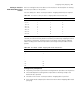
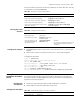
acl-rule: Issued ACL rules which can be the combination of various ACL rules. The way
of combination is described
Table 202.
Clearing the Traffic
Statistics
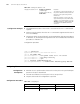
Configuration Example
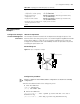
■ The GigabitEthernet1/0/1 of the switch is accessed into the 10.1.1.1/24 network
segment
■ Perform traffic statistics on packets form the 10.1.1.1/24 network segment
Configuration procedure:
<S4200G> system-view
System View: return to User View with Ctrl+Z.
[4200G] acl number 2000
[4200G-acl-basic-2000] rule permit source 10.1.1.1 0.0.0.255
[4200G-acl-basic-2000] rule deny source any
[4200G-acl-basic-2000] quit
[4200G] interface gigabitEthernet1/0/1
[4200G-GigabitEthernet1/0/1] traffic-statistic inbound ip-group 2000
Setting the
Precedence of Protocol
Packet
The protocol packet carries its own precedence. You can modify the precedence of
the protocol packet through setting its precedence. And then you can match the
precedence with the corresponding QoS action to perform the corresponding QoS
operation on the protocol packet.
Configuration
Prerequisites
■ The protocol type whose precedence needs modification is specified
■ The precedence value after modification is specified
Configuration Procedure
Table 202 The ways of issuing combined ACLs
The way of combination The form of acl-rule
Issue all the rules in an IP ACL separately ip-group acl-number
Issue a rule in an IP ACL separately ip-group acl-number rule rule
Issue all the rules in a Link ACL separately link-group acl-number
Issue a rule in a Link ACL separately link-group acl-number rule rule
Issue a rule in an IP ACL and a rule in a Link
ACL at the same time
ip-group acl-number rule rule link-group
acl-number rule rule
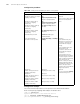
Table 203 Clearing the traffic statistics
Operation Command Description
Enter system view system-view -
Enter Ethernet port view interface interface-type
interface-number
-
Clear the statistics of the
traffic matching with the
specified ACL rules
reset traffic-statistic
inbound acl-rule
Required
The function of clearing is effective only
when the traffic statistics function is
configured
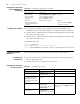
Table 204 Setting the precedence of the protocol packet
Operation Command Description
Enter system view system-view -