
3Com Switch 4200G Configuration Guide


Introduction to the Newly Added Cluster Functions 381
Notes
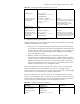
Perform the operations listed in Table 330 in cluster view on the master device. The
configuration can only be synchronized to the member devices in the white list only.
The configuration remains valid on a member device even if it quits the cluster or is
removed from the white list.
Configuration example
Synchronize the following SNMP configuration to all the member devices in a cluster
for logging into the cluster through an SNMP host.
1 Set read-community name to "aaa", write-community name to "bbb", group name
to "ggg", and MIP view name to "mmm". The MIP view contains the "org" sub-tree.
2 Set an SNMP V3 user named "uuu". The user belongs to the group named "ggg".
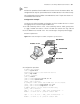
Network requirements
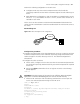
Figure 121 Network diagram for SNMP configuration synchronization
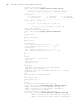
3 Configuration procedure
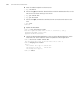
# Enable NDP and NTDP.
<S4200G>system-view
System View: return to User View with Ctrl+Z.
[S4200G]ndp enable
# Create a cluster.
[S4200G]cluster
[S4200G-cluster]ip-pool 168.192.0.1 24
[S4200G-cluster]build chwn
[chwn_0.S4200G-cluster]
# Configure a TFTP server and an SNMP host for the cluster.
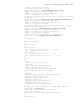
[chwn_0.S4200G-cluster]tftp-server 1.1.1.66
[chwn_0.S4200G-cluster]snmp-host 1.1.1.66
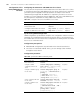
# Member devices join the cluster automatically.
[chwn_0.S4200G-cluster]
%Apr 7 03:00:07:981 2000 chwn_0.S4200G CLST/5/LOG:- 1 -
Member 000f-e224-055f is joined in cluster chwn.
%Apr 7 03:00:08:098 2000 chwn_0.S4200G CLST/5/LOG:- 1 -
Member 000f-e224-0560 is joined in cluster chwn.
Member 2
_
_
_
_
IP address 1.1.1.66
1/0/1Por t P
PC as the server
Command sw itch
Po r t P 1/ 0/ 4
Po r t P 1/ 0/3
Port
P 1/0/2
Me mbe r 1
Por t P
1/0/1
000f-e224-0562
000f-e224-0560
000f-e224-055f
Member 2
_
_
_
_
IP address 1.1.1.66
1/0/1Por t P
PC as the server
Command sw itch
Po r t P 1/ 0/ 4
Po r t P 1/ 0/3
Port
P 1/0/2
Me mbe r 1
Por t P
1/0/1
000f-e224-0562
000f-e224-0560
000f-e224-055f