
3Com Switch 8800 Family Command Reference Guide




IP Performance Configuration Commands 109
Example
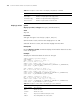
# Display the total number of FIB entries.
<SW8800> display fib statistics
Route Entry Count : 30
display icmp statistics Syntax
display icmp statistics
View
Any view
Parameter
None
Description
Use the display icmp statistics command to view the statistics information about
ICMP packets.
Related command: display ip interface, reset ip statistics.
Example
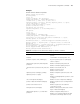
# View statistics about ICMP packets.
<SW8800> display icmp statistics
Input: bad formats 0 bad checksum 0
echo 5 destination unreachable 0
source quench 0 redirects 0
echo reply 10 parameter problem 0
timestamp 0 information request 0
mask requests 0 mask replies 0
time exceeded 0
Output:echo 10 destination unreachable 0
source quench 0 redirects 0
echo reply 5 parameter problem 0
timestamp 0 information reply 0
mask requests 0 mask replies 0
time exceeded 0
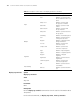
Tab le 13 Description on the fields of the display icmp statistics command
Field Description
bad formats Number of input packets in bad format
bad checksum Number of input packets with wrong checksum
echo Number of input/output echo request packets
destination
unreachable
Number of input/output packets with unreachable destination
source quench Number of input/output source quench packets
redirects Number of input/output redirected packets
echo reply Number of input/output echo reply packets
parameter problem Number of input/output packets with parameter problems
timestamp Number of input/output timestamp packets
information request Number of input information request packets