
3Com Switch 8800 Family Firewall Module Configuration and Command Reference Guide



Configuring Packet Filter Firewall 103
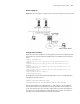
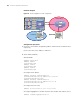
Network diagram
Figure 19 Network diagram of fragment packet filtering through packet filtering firewall
Configuration procedure
# Define an ACL that enables the security gateway to block the fragment packets
sourced from an external network and destined for the WWW server and Telnet
server.
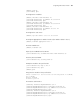
[SW8800] acl number 3001
[3Com-acl-adv-3001] rule 1 deny ip source any destination 200.1.1.1 0
fragment
[3Com-acl-adv-3001] rule 2 deny ip source any destination 200.1.1.2 0
fragment
[3Com-acl-adv-3001] rule 3 permit tcp source any destination 200.1.1.1 0
destination-port eq 80
[3Com-acl-adv-3001] rule 4 permit tcp source any destination 200.1.1.2 0
destination-port eq 23
[3Com-acl-adv-3001] rule 5 deny ip
[3Com-acl-adv-3001] quit
# Configure the packet filtering firewall, applying the ACL in the inbound traffic
through the external interface.
[SW8800] interface Ethernet 1/0/0
[3Com-Ethernet1/0/0] firewall packet-filter 3001 inbound
The ACL defined above for inbound traffic is used to block only the fragment
packets destined for the specified internal server and allow an external host to
access the internal server. For the traffic returned by the session initiated by the
internal host to pass through the security gateway, you need to either define a
new ACL rule or enable the ASPF function on the firewall.