
3Com Switch 8800 Family Firewall Module Configuration and Command Reference Guide



130 CHAPTER 8: TRANSPARENT FIREWALL
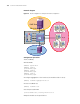
Network diagram
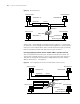
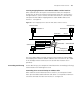
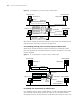
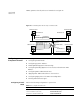
Figure 29 Network diagram for transparent firewall configuration
Configuration procedure
3Com (SecBlade)
# Divide VLANs.
<SW8800> system-view
[SW8800] vlan 10
[3Com-vlan10] quit
[SW8800] vlan 50
[3Com-vlan50] quit
[SW8800] vlan 60
[3Com-vlan60] quit
# Configure aggregation of the interfaces (the module resides in slot 2).
[SW8800] secblade aggregation slot 2
# Create a SecBlade test.
[SW8800] secblade test
# Set the protected VLAN.
[3Com-secblade-test] security-vlan 10 50 60
# Map the module to the specified slot.
SecBlade
S8505
Vlan
60
Vlan10
Vlan
50
Vlan
10
Trust Zone
Untrust
Zone
PC_A 172.16.0.10/24
DMZ Zone
PC C
172.16.0.60/24
Vlan 60
Vlan
50
PC_B
SecBlade
S8800
Vlan
60
Vlan10
Vlan
50
Vlan
10
Trust Zone
Untrust
Zone
PC_A 172.16.0.10/24
DMZ Zone
PC C
172.16.0.60/24
Vlan 60
Vlan
50
PC_B