
3Com Switch 8800 Family Firewall Module Configuration and Command Reference Guide



Configuring DNS Client 165
The value for hh:mm falls between 00:00 to 23:59. You can execute this
command for several times to add up to five triggering time points.
Configuring Timed Mail
Check Interval
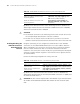
This is to specify the interval at which the firewall check whether the triggering
time for timed mails arrives. If yes, it will then send the mail. If not, no operation is
performed.
Perform the following configurations in system view.
By default, the time interval for timed mail check is 1 minute.
The shorter the interval is, the more instant information and efficiency is provided.
However, this also occupies more system resources.
Configuring Mail
Addresses
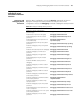
This is to configure the receiver’s address of timed mails.
Perform the following configurations in system view.
By default, no receiver’s address is configured for timed mails.
The specified address must be a standard SMTP mail address. You can execute this
command for several times to add up to five addresses.
Displaying and
Debugging SMTP Client
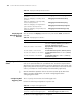
After the above configurations, you can execute the display command to display
configuration statistics of the SMTP client, so as to validate your configurations.
You can also run the debugging command to debug the SMTP client.
Configuring DNS
Client
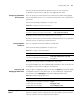
A DNS client (DNSC) is a component that is important for normal SMTP client
operation. A DNSC resolves a domain name into an IP address so that the SMTP
client can send the mail to the right destination address.
Tab le 190 Configure timed mail check interval
Operation Command
Configure timed mail check interval. smtpc timer interval minutes
Restore the default check interval for timed mails. undo smtpc timer interval
Tab le 191 Configure a timed mail address
Operation Command
Configure a receiver’s address of timed mail. smtpc administrator mail mail-address
Cancel the configured timed mail addresses.
undo smtpc administrator { all | mail
mail-address }
Tab le 192 Display and debug SMTP client
Operation Command
Display SMTP client configuration information
display smtpc [ administrator | timer |
trigger ]
Enable SMTP client debugging. debugging smtpc
Disable SMTP client debugging. undo debugging smtpc