
3Com Switch 8800 Family Firewall Module Configuration and Command Reference Guide


36 CHAPTER 4: AAA AND RADIUS/HWTACACS PROTOCOL CONFIGURATION
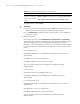
Perform the following configuration in system view
By default, there is no local user in the system.
Setting attributes of a local user
The attributes of a local user include user password display mode, user password,
user state, and the type of service that is authorized to the user.
Perform the following configuration in system view.
Where, auto means that the password display mode will be the one specified by
the user at the time of configuring password (see the password command in the
following table for reference), and cipher-force means that the password display
mode of all the accessing users must be in cipher text.
Perform the following configurations in local user view.
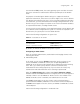
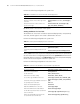
Tabl e 20 Create/delete a local user and the relevant properties
Operation Command
Add a local user. local-user user-name
Delete a local user or the service type of the
local user.
undo local-user user-name [ service-type |
level ]
Delete all local users or all local users of a
specific service type.
undo local-user all [ service-type { ftp |
ppp | ssh | telnet | terminal } ]
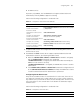
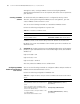
Tabl e 21 Set the password display mode for local users
Operation Command
Set the password display mode for all local
users.
local-user password-display-mode {
cipher-force | auto }
Cancel the password display mode for local
users.
undo local-user password-display-mode
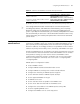
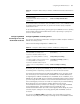
Tabl e 22 Set/remove the attributes concerned with a specified user
Operation Command
Set a user password. password { simple | cipher } password
Remove the user password. undo password
Set the user state. state { active | block }
Remove the user state setting. undo state { active | block }
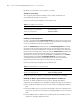
Set a service type available for the user. service-type { telnet | ssh | terminal | pad }
Cancel the service type available for the user.
undo service-type { telnet | ssh | terminal |
pad }
Set a priority level for the user. level level
Restore the default priority level. undo level
Authorized DVPN service to the user service-type dvpn
Remove the DVPN service authorization undo service-type dvpn
Set the directory that can be accessed if the
user is an FTP user.
service-type ftp [ ftp-directory directory]
Restore the default directory that can be
accessed if the user is an FTP user.
undo service-type ftp [ ftp-directory ]