
3Com Switch 8800 Family Firewall Module Configuration and Command Reference Guide

Troubleshooting AAA and RADIUS/HWTACACS Protocols 61
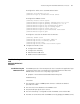
# Configure the Telnet user to use AAA authentication.
[secblade] user-interface vty 0 4
[secblade-ui-vty0-4] authentication-mode scheme
# Configure the RADIUS scheme.
[secblade] hwtacacs scheme system
[secblade-hwtacacs-system] primary authentication 10.0.0.1 49
[secblade-hwtacacs-system] primary accounting 10.0.0.1 49
[secblade-hwtacacs-system] key authentication expert
[secblade-hwtacacs-system] key accounting expert
[secblade-hwtacacs-system] server-type 3Com
[secblade-hwtacacs-system] user-name-format with-domain
[secblade-hwtacacs-system] quit
# Configure to associate the domain with the TACACS.
[secblade] domain tacacs
[secblade-isp-tacacs] access-limit enable 10
[secblade-isp-tacacs] accounting optional
[secblade-isp-tacacs] quit
[secblade-isp-tacacs] scheme tacacs-scheme system
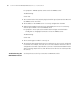
4 Configure the TACACS server
■ Configure the IP address
■ Configure the shared key
■ Add username test@ tacacs
■ Enable one-time authentication
Troubleshooting AAA
and
RADIUS/HWTACACS
Protocols
Troubleshooting the
RADIUS Protocol
The RADIUS protocol of the TCP/IP protocol suite is located at the application layer.
It mainly provisions how to exchange user information between a NAS and a
RADIUS server of an ISP. So it is very likely to get invalid.
■ Symptom 1: User authentication/authorization always fails
Troubleshooting:
Check that:
1 The username is in the userid@isp-name format or a default ISP domain is
specified on the NAS.
2 The user exists in the database on the RADIUS server.
3 The password input by the user is correct.
4 The same shared key is configured on both the RADIUS server and the NAS.
5 The NAS can communicate with the RADIUS server (by pinging the RADIUS server).