
3Com Switch 4200G Configuration Guide







88 CHAPTER 17: PORT SECURITY CONFIGURATION
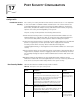
Configuring Port
Security
userlogin-
secure
The port opens only after the access user passes the
802.1x authentication. Even after the port opens, only
the packets of the successfully authenticated user can
pass through the port.
In this mode, only one 802.1x-authenticated user is
allowed to access the port.
When the port changes from the normal mode to this
security mode, the system automatically removes the
already existing dynamic MAC address entries and
authenticated MAC address entries on the port.
In these modes, only
the NTK and
Intrusion Protection
features take effect.
userlogin-
withoui
This mode is similar to the userlogin-secure mode,
except that there can be one OUI-carried MAC address
being successfully authenticated in addition to the single
802.1x-authenticated user who is allowed to access the
port.
When the port changes from the normal mode to this
security mode, the system automatically removes the
already existing dynamic/authenticated MAC address
entries on the port.
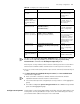
mac-
authentication
In this mode, MAC address-based authentication is
performed for access users.
mac-or-
userlogin-
secure
In this mode, the two kinds of authentication in
mac-authentication and userlogin-secure modes can
be performed simultaneously. If both kinds of
authentication succeed, the userlogin-secure mode
takes precedence over the mac-authentication mode.
mac-else-
userlogin
In this mode, first the MAC-based authentication is
performed. If this authentication succeeds, the
mac-authentication mode is adopted, or else, the
authentication in userlogin-secure mode is performed.
userlogin-
secure-ext
This mode is similar to the userlogin-secure mode,
except that there can be more than one
802.1x-authenticated user on the port.
userlogin-
secure-or-mac-
ext
This mode is similar to the userlogin-secure-or-mac
mode, except that there can be more than one
802.1x-authenticated user on the port.
mac-or-
userlogin-
secure-ext
This mode is similar to the userlogin-secure-else-mac
mode, except that there can be more than one
802.1x-authenticated user on the port.
Table 65 Description of the port security modes (Continued)
Security
mode
Description Feature
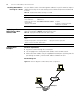
Table 66 Configure port security
Operation Command Description
Enter system view system-view —
Enable port security port-security enable Required
Set OUI value for user
authentication
port-security OUI OUI-value index
index-value
Optional
Enable the sending of
type-specific trap
messages
port-security trap { addresslearned |
intrusion | dot1xlogon | dot1xlogoff |
dot1xlogfailure | ralmlogon | ralmlogoff |
ralmlogfailure }*
Optional
By default, sending of
trap messages is disabled.
Enter Ethernet port
view
interface interface-type interface-number —