
3Com Switch 4200G Configuration Guide





100 CHAPTER 19: LOGGING IN THROUGH TELNET
Telnet Configuration
with Authentication
Mode Being None
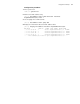
Configuration Procedure
Scheme Specify to
perform local
authentication or
RADIUS
authentication
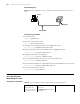
AAA configuration
specifies whether to
perform local
authentication or
RADIUS authentication
Optional
Local authentication is
performed by default.
Refer to “AAA&RADIUS
Configuration” for more.
Configure user
name and
password
Configure user names
and passwords for
local/remote users
Required
■ The user name and
password of a local user are
configured on the switch.
■ The user name and
password of a remote user
are configured on the
RADIUS server. Refer to user
manual of RADIUS server for
more.
Manage VTY
users
Set service type for
VTY users
Required
Perform common
configuration
Perform common
Telnet configuration
Optional
Refer to Table 75.
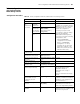
Table 76 Telnet configurations for different authentication modes (Continued)
Authentication
mode
Telnet configuration Description
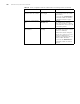
Table 77 Telnet configuration with the authentication mode being none
Operation Command Description
Enter system view system-view —
Enter one or more VTY
user interface views
user-interface vty first-number [
last-number ]
—
Configure not to
authenticate users
logging into VTY user
interfaces
authentication-mode none Required
By default, VTY users are
authenticated after logging in.
Configure the
command level
available to users
logging into VTY user
interface
user privilege level level Optional
By default, commands of level 0 are
available to users logging into VTY
user interfaces.
Configure the
protocols to be
supported by the VTY
user interface
protocol inbound { all | ssh |
telnet }
Optional
By default, both Telnet protocol and
SSH protocol are supported.
Make terminal services
available
shell Optional
By default, terminal services are
available in all user interfaces.
Set the maximum
number of lines the
screen can contain
screen-length screen-length Optional
By default, the screen can contain
up to 24 lines.
You can use the screen-length 0
command to disable the function to
display information in pages.