
3Com Switch 4200G Configuration Guide



Root Bridge Configuration 127
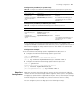
Configuration procedure (in system view)
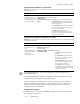
Configuration procedure (in Ethernet port view)
As the maximum transmitting speed parameter determines the number of the
configuration BPDUs transmitted in each Hello time, set it to a proper value to avoid
MSTP from occupying too many network resources. The default is recommended.
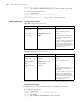
Configuration example
1 Set the maximum transmitting speed of GigabitEthernet1/0/1 port to 5.
■ Configure the maximum transmitting speed in system view.
<S4200G> system-view
System View: return to User View with Ctrl+Z.
[4200G] stp interface GigabitEthernet1/0/1 transmit-limit 5
■ Configure the maximum transmitting speed in Ethernet port view.
<S4200G> system-view
System View: return to User View with Ctrl+Z.
[4200G] interface GigabitEthernet1/0/1
[4200G-GigabitEthernet1/0/1] stp transmit-limit 5
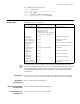
Edge Port
Configuration
Edge ports are ports that neither directly connects to other switches nor indirectly
connects to other switches through network segments. After a port is configured as
an edge port, rapid transition is applicable to the port. That is, when the port changes
from blocking state to forwarding state, it does not have to wait for a delay.
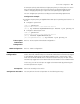
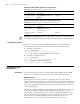
You can configure a port as an edge port in the following two ways.
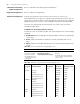
Table 94 Configure the maximum transmitting speed for specified ports in system view
Operation Command Description
Enter system view system-view —
Configure the
maximum transmitting
speed for specified
ports
stp interface interface-list
transmit-limit packetnumber
Required
The maximum transmitting speed
of all Ethernet ports on a switch
defaults to 3.
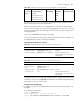
Table 95 Configure the maximum transmitting speed in Ethernet port view
Operation Command Description
Enter system view system-view —
Enter Ethernet port
view
interface interface-type
interface-number
—
Configure the
maximum transmitting
speed
stp transmit-limit packetnum Required
The maximum transmitting speed
of all Ethernet ports on a switch
defaults to 3.