
3Com Switch 4200G Configuration Guide



134 CHAPTER 20: MSTP CONFIGURATION
■ Configure in Ethernet port view.
<S4200G> system-view
System View: return to User View with Ctrl+Z.
[4200G] interface GigabitEthernet1/0/1
[4200G-GigabitEthernet1/0/1] stp instance 1 cost 2000
Configuration example (B)
1 Change the path cost of GigabitEthernet1/0/1 port in spanning tree instance 1 to the
default one calculated with the IEEE 802.1D-1998 standard.
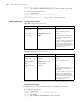
■ Configure in system view.
<S4200G> system-view
System View: return to User View with Ctrl+Z.
[4200G] undo stp interface GigabitEthernet1/0/1 instance 1 cost
[4200G] stp pathcost-standard dot1d-1998
■ Configure in Ethernet port view.
<S4200G> system-view
System View: return to User View with Ctrl+Z.
[4200G] interface GigabitEthernet1/0/1
[4200G-GigabitEthernet1/0/1] undo stp instance 1 cost
[4200G-GigabitEthernet1/0/1] quit
[4200G] stp pathcost-standard dot1d-1998
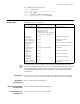
Port Priority
Configuration
Port priority is an important criterion on determining the root port. In the same
condition, a port with higher port priority is more potential to become the root port
than another port with lower priority.
A port on a MSTP-enabled switch can have different port priorities and play different
roles in different spanning tree instances. This enables packets of different VLANs to
be forwarded along different physical paths, so that load balancing can be achieved
by VLANs.
You can configure port priority in the following two ways.
Configuring port priority in system view
Configuring port priority in Ethernet port view
Changing port priority of a port may change the role of the port and put the port into
state transition.
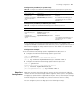
Table 107 Configure port priority for specified ports in system view
Operation Command Description
Enter system view system-view —
Configure port priority
for specified ports
stp interface interface-list
instance instance-id port
priority priority
Required
The default port priority is 128.
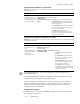
Table 108 Configure port priority for a specified port in Ethernet port view
Operation Command Description
Enter system view system-view —
Enter Ethernet port
view
interface interface-type
interface-number
—
Configure port priority
for the port
stp [ instance instance-id ] port
priority priority
Required.
The default port priority is 128.