
3Com Switch 4200G Configuration Guide






2 CHAPTER 1: CLI OVERVIEW
Setting a user level switching password
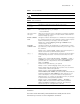
Table 1 lists the operations to set a user level switching password.
Switching to another user level
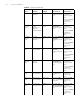
Table 2 lists operations to switch to another user level.
For security purpose, the password a user enters when switching to a higher user level
is not displayed. A user will remain at the original user level if the user has tried three
times to enter the correct password but fails to do this.
Configuring the Level of
a Specific Command in a
Specific View
You can configure the level of a specific command in a specific view. Commands fall
into four command levels: visit, monitor, system, and manage, which are identified as
0, 1, 2, and 3 respectively. The administrator can change the command level a
command belongs to.
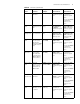
Table 3 lists the operations to configure the level of a specific command.
CLI Views CLI views are designed for different configuration tasks. They are interrelated. You will
enter user view once you log into a switch successfully, where you can perform
operations such as displaying operation status and statistical information. And by
executing the system-view command, you can enter system view, where you can
enter other views by executing the corresponding commands.
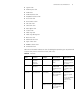
The following CLI views are provided:
■ User view
Tab le 1 Set a user level switching password
Operation Command Description
Enter system view system-view —
Set a password for
switching from a lower
user level to the user
level identified by the
level argument
super password [ level level ]
{ simple | cipher } password
Optional
A password is necessary only when
a user switches from a lower user
level to a higher user level.
Tab le 2 Switch to another user level
Operation Command Description
Switch to the user level
identified by the level
argument
super [ level ] Required
Execute this command in user view.
If a password for switching to the
user level identified by the level
argument is set and you want to
switch to a lower user level, you will
remain at the lower user level unless
you provide the correct password
after executing this command.
Tab le 3 Configure the level of a specific command in a specific view
Operation Command Description
Enter system view system-view —
Configure the level of a
specific command in a
specific view
command-privilege level level
view view command
Required
Use this command with caution to
prevent inconvenience on
maintenance and operation.