
3Com Switch 4200G Configuration Guide



224 CHAPTER 27: QOS CONFIGURATION
Configuring Priority
Mapping
Refer to Priority Mapping for introduction to priority mapping.
Setting to Trust the Port
Precedence
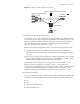
In the mode of trusting the port precedence, the switch will replace the 802.1p
priority carried in the packet with the precedence of the receiving port and then
assign the local precedence for the packet according to the precedence of the
receiving port.
Configuration prerequisites
■ The priority trust mode is specified to trusting the port precedence
■ The port that needs port precedence configuration is specified.
■ The precedence value of the specified port is specified.
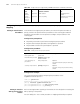
Configuration procedure
Configuration example
Set to trust the port precedence and specify the precedence of the
GigabitEthernet1/0/1 port to 7.
<S4200G> system-view
System View: return to User View with Ctrl+Z.
[4200G] interface gigabitethernet1/0/1
[4200G-GigabitEthernet1/0/1] undo priority-trust
[4200G-GigabitEthernet1/0/1] priority 7
Setting to Trust the
802.1p priority of the
Packets
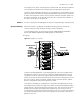
Refer to Trusting the 802.1p priority of the Packets for the description on trusting the
802.1p priority of the packets.
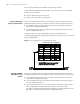
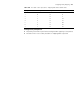
You can modify the “COS-->other precedence” mapping relationship as required.
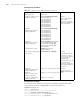
Traffic
statistics
Supported traffic-statistic Configuring Traffic
Statistics
Set the
priority of
protocol
packets
Supported protocol-priority Setting the Precedence of
Protocol Packet
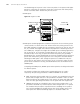
Table 188 The QoS functions supported by S4200G and related commands (Continued)
QoS
Specificati
on
Related command Link
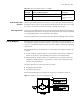
Table 189 Setting to trust the port precedence
Operation Command Description
Enter system view system-view -
Enter Ethernet port view interface interface-type
interface-number
-
Set to trust the port
precedence
undo priority-trust Optional
The switch trusts the port precedence by
default.
Set the port precedence priority priority-level Optional
The value of the port precedence is 0 by
default.