
3Com Switch 4200G Configuration Guide


230 CHAPTER 27: QOS CONFIGURATION
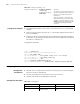
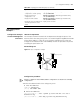
Configuration Example ■ The GigabitEthernet1/0/1 of the switch is accessed into the 10.1.1.1/24 network
segment
■ Perform TP on the packets from the 10.1.1.1/24 network segment and the rate of
TP is set to100kbps
■ The packets within the specified traffic are forwarded after their DSCP precedence
is marked as 16, and the packets beyond the traffic are forwarded after their DSCP
precedence is marked as 56
Configuration procedure
<S4200G> system-view
System View: return to User View with Ctrl+Z.
[4200G] acl number 2000
[4200G-acl-basic-2000] rule permit source 10.1.1.1 0.0.0.255
[4200G-acl-basic-2000] rule deny source any
[4200G-acl-basic-2000] quit
[4200G] interface gigabitEthernet1/0/1
[4200G-GigabitEthernet1/0/1] traffic-limit inbound ip-group 2000 100
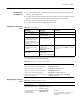
Configuring TS Refer to T for the introduction to TS.
Configuration
Prerequisites
■ Whether the TS is performed on all the traffic on the port or the specified output
queues on the port is determined
■ The max rate and burst size of the port in the TS are specified
■ The ports that needs this configuration is specified
Configuration Procedure
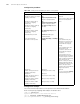
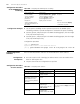
Display the statistics of TP display qos-interface
{ interface-type
interface-num | unit-id }
traffic-limit
Required
The statistics of TP includes the bytes of
the packets within the limited rate and
the bytes of the packets beyond the
limited rate.
When the statistics count reaches the
upper threshold, the switch will restart
statistics. It is recommended to use the
display command to display within 30
seconds after the reset command is
executed
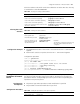
Table 197 Clearing the statistics of TP
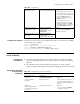
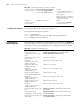
Table 198 Configuring TS
Operation Command Description
Enter system view system-view -
Enter Ethernet port view interface interface-type
interface-number
TS cannot be performed on the piled
ports