
3Com Switch 4200G Configuration Guide



SSH Terminal Services 315
SSH Server
Configuration Example
Network requirements
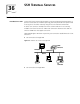
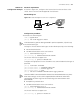
As shown in Figure 101, configure a local connection from the SSH client to the
switch. The PC runs the SSH2.0-supported client software.
Network diagram
Figure 101 Network diagram for SSH server configuration
Configuration procedure
1 Generate a local RSA key pair.
<S4200G>system-view
[4200G] rsa local-key-pair create
If the local RSA key pair has been generated in previous operations, skip this step.
2 Set authentication type.
Settings for the two authentication types are described respectively in the following:
■ Password authentication
■ Set AAA authentication on the user interfaces.
[4200G] user-interface vty 0 4
[4200G-ui-vty0-4] authentication-mode scheme
Set the user interfaces to support SSH.
[4200G-ui-vty0-4] protocol inbound ssh
Configure the login protocol for the clinet001 user as SSH and authentication type as
password.
[4200G] local-user client001
[4200G-luser-client001] password simple abc
[4200G-luser-client001] service-type ssh
[4200G-luser-client001] quit
[4200G] ssh user client001 authentication-type password
Select the default SSH authentication timeout time and authentication retry times.
After these settings, run the SSH2.0-supported client software on other hosts
connected to the switch. Log in to the switch using user name client001 and
password abc.
■ RSA public key authentication
■ Set AAA authentication on the user interfaces.
[4200G] user-interface vty 0 4
[4200G-ui-vty0-4] authentication-mode scheme
Set the user interfaces to support SSH.
[4200G-ui-vty0-4] protocol inbound ssh
SSH Client
Switch
SSH ServerPC
SSH Client
Switch
SSH ServerPC