
3Com Switch 4200G Configuration Guide



328 CHAPTER 37: FILE SYSTEM MANAGEMENT
■ Managing a configuration file
■ Renaming a file
■ Copying a file
■ Moving a file
■ Displaying the content of a file
■ Displaying the information about a file
■ Checking file system
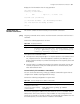
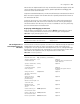
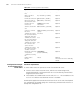
Table 283 describes the file-related operations.
Perform the following configuration in user view.
CAUTION: For deleted files whose names are the same, only the latest deleted file
can be restored.
The files which are deleted using the delete command with the /unreserved
keyword not specified are actually moved to the recycle bin and thus still take storage
space. You can clear the recycle bin to make room for other files by using the reset
recycle-bin command.
If the configuration files are deleted, the switch adopts the default configuration
parameters when it starts the next time.
You can consider clearing the configuration files in the Flash when:
■ The configuration files in the Flash are not compatible with the system software.
(This may occur after you upgrade the system software of the switch.)
■ The configuration files are corrupted. (This is usually because a wrong
configuration file is loaded.)
Table 283 File operations
Operation Command Description
Delete a file delete [ /unreserved ] file-url
delete { running-files |
standby-files } [ /unreserved ]
Optional
A deleted file can be restored if you
delete it by executing the delete
command with the /unreserved
keyword not specified. You can use
the undelete command to restore
a deleted file of this kind.
Restore a deleted file undelete file-url Optional
Delete a file in the
recycle bin
reset recycle-bin [ file-url ] [
/force ]
Optional
Rename a file rename fileurl-source fileurl-dest Optional
Copy a file copy fileurl-source fileurl-dest Optional
Move a file move fileurl-source fileurl-dest Optional
Display the content of
a file
more file-url Optional
Currently, the file system only
supports displaying the contents of
a file in texts.
Display the information
about a directory or a
file
dir [ /all ] [ file-url ] Optional