
3Com Switch 4200G Configuration Guide



354 CHAPTER 40: BOOTROM AND HOST SOFTWARE LOADING
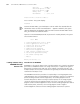
CPU type : BCM4704
CPU Clock Speed : 200MHz
BUS Clock Speed : 33MHz
Memory Size : 64MB
Mac Address : 00e0fc005104
Press Ctrl-B to enter Boot Menu… 5
Press <Ctrl+B>. The system displays:
Password :
To enter the Boot Menu, you should press <Ctrl+B> within five seconds after the
information “Press Ctrl-B to enter Boot Menu…” appears. Otherwise, the system
starts to decompress the program; and if you want to enter the Boot Menu at this
time, you will have to restart the switch.
Input the correct BootROM password (no password is need by default). The system
enters the Boot Menu:
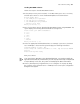
BOOT MENU
1. Download application file to flash
2. Select application file to boot
3. Display all files in flash
4. Delete file from flash
5. Modify bootrom password
6. Enter bootrom upgrade menu
7. Skip current configuration file
8. Set bootrom password recovery
9. Set switch startup mode
0. Reboot
Enter your choice(0-9):
Loading Software Using
XMODEM Through
Console Port
Introduction to XMODEM
XMODEM is a file transfer protocol that is widely used due to its simplicity and good
performance. XMODEM transfers files using Console port. It supports two types of
data packets (128 bytes and 1 KB), two check methods (checksum and CRC), and
multiple attempts of error packet retransmission (generally the maximum number of
retransmission attempts is ten).
The XMODEM transmission procedure is completed by a receiving program and a
sending program: The receiving program sends negotiation characters to negotiate a
packet checking method. After the negotiation, the sending program starts to
transmit data packets. When receiving a complete packet, the receiving program
checks the packet using the agreed method. If the check succeeds, the receiving
program sends an acknowledgement character and the sending program proceeds to
send another packet; otherwise, the receiving program sends a negative
acknowledgement character and the sending program retransmits the packet.