
3Com Switch 4200G Configuration Guide


DHCP Relay Displaying 399
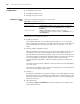
DHCP Relay Displaying You can verify your DHCP relay-related configuration by executing the following
display commands in any view.
DHCP Relay
Configuration
Example
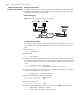
Network requirements
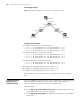
The DHCP clients on the network segment 10.110.0.0 (255.255.255.0) are
connected to a port of VLAN 2, which has been created on the switch acting as a
DHCP relay. The IP address of the DHCP server is 202.38.1.2. DHCP packets between
the DHCP clients and the DHCP server are forwarded by the DHCP relay, through
which the DHCP clients can obtain IP addresses and related configuration information
from the DHCP server.
Network diagram
Figure 125 Network diagram for DHCP relay
Configuration procedure
1 Enter system view.
<S4200G> system-view
2 Enable DHCP.
[4200G] dhcp enable
3 Create DHCP server group 1 and configure an IP address of 202.38.1.2 for it.
[4200G] dhcp-server 1 ip 202.38.1.2
4 Map VLAN 2 interface to DHCP server group 1.
[4200G] interface vlan-interface 2
[4200G-Vlan-interface2] dhcp-server 1
5 Configure an IP address for VLAN 2 interface, so that this interface is on the same
network segment with the DHCP clients.)
[4200G-Vlan-interface2] ip address 10.110.1.1 255.255.0.0
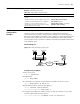
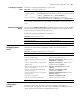
Table 343 Display DHCP relay information
Operation Command
Display information about a specified DHCP server
group
display dhcp-server groupNo
Display information about the DHCP server group
to which a specified VLAN interface is mapped
display dhcp-server interface
vlan-interface vlan-id
Display one or all user address entries, or a
specified type of entries in the valid user address
table of the DHCP server group
display dhcp-security [ ip-address |
dynamic | static | tracker ]
Ethernet
Ethernet
Internet
DHCP client
DHCP client
Switch ( DHCP relay )
10.110.0.0
DHCP server
202.38.1.2
10.110.1.1
202. 3 8. 0.0
202.38.1.1
Ethernet
Ethernet
Internet
DHCP client
DHCP client
Switch ( DHCP relay )
10.110.0.0
DHCP server
202.38.1.2
10.110.1.1
202. 3 8. 0.0
202.38.1.1