
3Com Switch 4200G Configuration Guide


48
UDP HELPER CONFIGURATION
Overview of UDP
Helper
The major function of UDP Helper is to relay-forward UDP broadcast packets, that is,
it can convert UDP broadcast packets into unicast packets and send to the designated
server, as a relay.
When UDP Helper starts, the switch can judge if to forward the UDP broadcast
packets received at the port based on UDP port ID. If yes, the switch then modifies the
IP address in the IP packet header and sends the packet to the designated destination
server. Otherwise, it sends the packet to the upper layer module for further
processing.
UDP Helper
Configuration
UDP Helper configuration include:
■ Enabling/disabling UDP Helper function
■ Configuring UDP port with replay function
■ Configuring the relay destination server for broadcast packets
Enabling/disabling UDP
Helper Function
When UDP Helper function is enabled, you can configure the UDP ports where UDP
function is required and the relay function is enabled at UDP ports 69, 53, 37, 137,
138 and 49. When the function is disabled. Relay function configured at all UDP
ports, including the default six ports, shall be disabled.
Perform the following configuration in system view.
By default, UDP Helper function is disabled.
Configuring UDP Port
with Replay Function
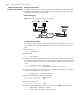
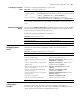
When UDP relay function is enabled, the system by default forwards the broadcast
packets on the UDP ports listed in Table 349. You can configure up to 256 UDP ports
with relay function.
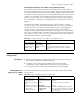
Table 348 UDP Helper function
Operation Command
Enable UDP Helper function udp-helper enable
Disable UDP Helper function undo udp-helper enable
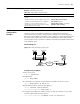
Table 349 Default UDP ports list
Protocol UDP port ID
Trivial File Transfer Protocol (TFTP) 69
Domain Name System (DNS) 53
Time service 37
NetBIOS Name Service (NetBIOS-NS) 137
NetBIOS Datagram Service (NetBIOS-DS) 138
Terminal Access Controller Access Control System
(TACACS)
49