
3Com Switch 4200G Configuration Guide


Overview of UDP Helper 407
UDP Helper
Configuration Example
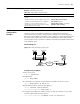
Networking requirement
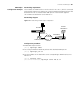
The IP address of VLAN interface 2 on the switch is 10.110.1.1, which is connected
with network segment 10.110.0.0. Set to relay-forward the broadcast packets with
destination IP of all 1s and destination UDP port 55 in the network segment
10.110.0.0 to the destination server 202.38.1.2.
Networking diagram
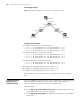
Figure 127 Networking for UDP Helper configuration
Configuration procedure
1 Enable UDP Helper function.
[4200G] udp-helper enable
2 Set to relay-forward the broadcast packets with destination UDP port 55.
[4200G] udp-helper port 55
3 Set the IP address of the destination server corresponding to VLAN interface 2 as
202.38.1.2.
[4200G] interface vlan 2
[4200G-Vlan-interface2] udp-helper server 202.38.1.2
Ethernet
Ethernet
Internet
Switch ( UDP Helper )
10.110.0.0
Server
202.38.1.2
10.110.1.1
202.38.0.0
202.38.1.1