
3Com Switch 4200G Configuration Guide


Controlling Web Users by Source IP Address 39
Controlling Web
Users by Source
IP Address
You can manage a S4200G series Ethernet switch remotely through Web. Web users
can access a switch through HTTP connections.
You need to perform the following two operations to control Web users by source IP
addresses.
■ Defining an ACL
■ Applying the ACL to control Web users
Prerequisites The controlling policy against Web users is determined, including the source IP
addresses to be controlled and the controlling actions (permitting or denying).
Controlling Web Users
by Source IP Addresses
Controlling Web users by source IP addresses is achieved by applying basic ACLs,
which are numbered from 2000 to 2999.
Disconnecting a Web
User by Force
The administrator can disconnect a Web user by force using the related command.
Configuration
Example
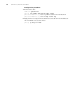
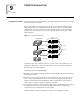
Network requirements
Only the users sourced from the IP address of 10.110.100.46 are permitted to access
the switch.
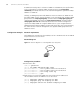
Network diagram
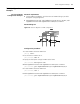
Figure 18 Network diagram for controlling Web users using ACLs
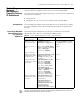
Table 28 Control Web users by source IP addresses
Operation Command Description
Enter system view system-view
Create a basic ACL or
enter basic ACL view
acl number acl-number [
match-order { config | auto }]
As for the acl number command,
the config keyword is specified by
default.
Define rules for the
ACL
rule [ rule-id ] { permit | deny } [
source { sour-addr sour-wildcard
| any }] [ time-range
time-name ] [ fragment ]
Required
Quit to system view quit
Apply the ACL to
control Web users
ip http acl acl-number Optional
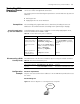
Table 29 Disconnect a Web user by force
Operation Command Description
Disconnect a Web user
by force
free web-users { all | user-id
userid | user-name username }
Required
Execute this command in user view.
Inter net
Sw itc h
Inter net
Sw itc h