
3Com Switch 4200G Configuration Guide


44 CHAPTER 9: VLAN CONFIGURATION
VLAN Classification You can create port-based and policy-based VLAN types a Switch 4200G:
The port-based VLAN members are defined in terms of switch ports. You can add
ports to which close-related hosts are connected to the same port-based VLAN. This is
the simplest yet most effective way to create VLANs.
Policy-based VLANs enable a switch to forward received packets that match specific
QoS/ACLs to specific VLANs. For instructions on creating policy-based VLANs, see
“QoS Configuration” on page 213.
VLAN Configuration
Basic VLAN
Configuration
Configuring a
Port-Based VLAN
Configuration prerequisites
Before configuring a port-based VLAN, you need to create it first.
Configuration procedure
Displaying a VLAN After the above configuration, you can execute the display command in any view to
view the running of the VLAN configuration, and to verify the effect of the
configuration.
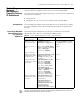
Table 31 Basic VLAN configuration
Operation Command Description
Enter system view system-view -
Create a VLAN and
enter VLAN view
vlan vlan-id Required
The vlan-id argument ranges from 1
to 4094.
Assign a name for the
VLAN
name Optional
By default, the name of a VLAN is
its VLAN ID.
Specify the description
string of the VLAN
description string Optional
By default, the description string of
a VLAN is its VLAN ID.
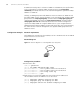
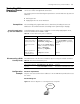
Table 32 Configure a port-based VLAN
Operation Command Description
Enter system view system-view -
Enter VLAN view vlan vlan-id Required
The vlan-id argument ranges 1 from
to 4094.
Add specified Ethernet
ports to the VLAN
port interface-list Required
By default, all the ports belong to
the default VLAN.
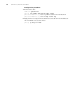
Table 33 Display the information about specified VLANs
Operation Command
Display the information about
specified VLANs
display vlan [ vlan-id1 [ to vlan-id2 ] | all | static | dynamic ]