
3Com Switch 8800 Family Firewall Module Configuration and Command Reference Guide

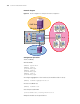

the firewall
works as a
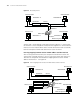
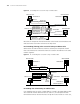
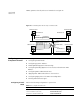
HUB to guarantee that all packets are forwarded. See
Figure 28.
Figure 28 Forwarding after failed lookup on address table
Configuring
Transparent Firewall
The following sections describe transparent firewall configuration tasks:
■ “Configuring Firewall Mode”
■ “Configuring System IP Address”
■ “Enabling/Disabling Dynamic ARP Learning”
■ “Configuring Handling Approach for the Packets with Unknown MAC
Address”
■ “Configuring MAC Address-Based ACLs”
■ “Applying MAC Address-Based ACL to the Interface”
■ “Configuring Aging Time of the MAC Forwarding Table”
■ “Defining Allowed Packet Types”
Configuring Firewall
Mode
Perform the following configuration in system view.
Workstation A
00 e 0 . fca a . a aa a
Workstation B
00 e 0 . fcbb . bbbb
Workstation C
Workstation D
00 e 0 . fcdd . dddd 00 e 0 . fccc . cccc
Interface 1
Interface 2
Ethernet segment 1
Ethernet segment 2
MAC address Port
00 e 0 . fcaa . aaaa
1
00 e 0 . fcbb . bbbb
1
Address table
00 e 0 . fcaa . aaaa 00 e 0 . fccc . cccc
Source
Destination
Switch 8800
Tab le 111 Configure firewall mode
Operation Command
Set the firewall in transparent mode firewall mode transparent
Set the firewall in route mode firewall mode route
Restore the default firewall mode undo firewall mode