
3Com Switch 8800 Family Firewall Module Configuration and Command Reference Guide

142 CHAPTER 9: WEB AND E-MAIL FILTERING
Perform the following configuration in system view.
Saving/Loading an E-mail content filtering file
After configuring the E-mail content filtering keywords, you can save them to an
E-mail content filtering file for later use. You must load an E-mail content filtering
file first to configure or modify items in it.
Perform the following configuration in system view.
You must load the E-mail content filtering file for items in it to take effect, that is,
for E-mails that match these items to be filtered.
Configuring E-mail
Attachment Filtering
You can also filter outgoing E-mails by their attachments.
Enabling/Disabling E-mail attachment filtering
Before configuring E-mail attachment filtering for a firewall, you must enable this
function first for related configurations to take effect.
Perform the following configuration in system view.
c
CAUTION: You must configure ASPF policies and execute the detect smtp and
detect tcp commands first to enable E-mail attachment filtering. Refer to section
“Configuring ASPF” “Configuring ASPF” for information about ASPF.
E-mail attachment filtering is disabled by default.
Configuring an attachment name for E-mail attachment filtering
E-mails can be filtered according to the attachment name items previously
configured in an E-mail attachment filtering file. The administrator can manipulate
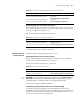
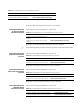
Tabl e 143 Configure a filtering keyword for E-mail content filtering
Operation Command
Add an E-mail content filtering keyword
firewall smtp-filter content add
content-keywords
Delete an E-mail content filtering keyword
firewall smtp-filter content delete
content-keywords
Clear all E-mail content filtering keywords firewall smtp-filter content clear
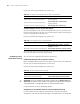
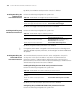
Tabl e 144 Save /Load an E-mail content filtering file
Operation Command
Save /Load an E-mail content filtering file
firewall smtp-filter content { save-file |
load-file } file-name
Unload the current E-mail content filtering file undo firewall smtp-filter content load-file
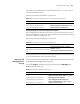
Tabl e 145 Enable E-mail attachment filtering
Operation Command
Enable E-mail attachment filtering firewall smtp-filter attach enable
Disable E-mail attachment filtering undo firewall smtp-filter attach enable