
3Com Switch 8800 Family Firewall Module Configuration and Command Reference Guide


158 CHAPTER 10: ATTACK PREVENTION AND PACKET STATISTICS
By default, only the warning information is output, that is, the warning level is
warning by default.
Enabling/Disabling the
Oversized ICMP Packet
Control Function
Perform the following configuration in system view.
By default, the oversized ICMP packet control function is disabled. The maximum
length of the packet is 28 to 65535 bytes. The default value is 8000.
Configuring
System-Based
Statistics
The system-based statistics function of the Firewall module restricts connection
number. Before configuring the traffic restriction function, you should enable the
corresponding statistics function. Once the statistics function is disabled, the
associated restriction alarm function will be invalid accordingly.
The system-based statistics function configuration includes:
■ Enabling the system-based statistics function
■ Enabling monitor the number of system-based connections
■ Enabling alarm detection for abnormal system packet rate
Enabling/Disabling the
System-Based Statistics
Function
Enable the system-based statistics function to perform statistics on all the packets
passing the firewall.
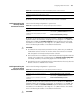
Perform the following configuration in system view.
By default, the system-based statistics function is enabled.
c
CAUTION: Please use the undo firewall statistics system enable command
with caution. If the system-based statistics function is disabled, the associated
detection function will be invalid accordingly. If there is traffic, disabling the
statistics function may cause inaccurate statistics. Thus, functions related to
statistics are affected.
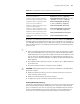
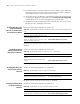
Set the warning level to warning only undo firewall statistic warning-level drop
Table 176 Set the warning level in monitoring the number and rate of connections
Operation Command
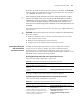
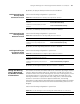
Tabl e 177 Enable/disable the oversized packet attack prevention function
Operation Command
Enable the oversized ICMP packet control
function
firewall defend large-icmp [ length ]
Disable the oversized ICMP packet control
function
undo firewall defend large-icmp
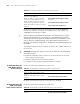
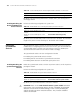
Tabl e 178 Enable/disable the system-based statistics function
Operation Command
Enable the system-based statistics function firewall statistics system enable
Disable the system-based statistics function undo firewall statistics system enable