
3Com Switch 8800 Family Firewall Module Configuration and Command Reference Guide


160 CHAPTER 10: ATTACK PREVENTION AND PACKET STATISTICS
■ Enabling the zone-based connection rate monitoring
Enabling/Disabling the
Zone-Based Statistics
Function
Perform the following configuration in zone view.
Be default, the zone-based statistics function is disabled.
c
CAUTION: If the zone-based statistics function is disabled, the associated traffic
monitoring function will be invalid accordingly.
Enabling/Disabling the
Zone-Based Connection
Count Monitoring
Using this command, you can configure the threshold value for the number of
TCP/UDP connections based on one direction in a security zone. According to the
above configuration, you can restrict the number of connections to or from the
current zone. In other words, the system will deny the subsequent connection
requests without any alarm if the connection number is greater than the set
threshold value. Once the zone-based statistics function is enabled, the default
value of the connection count monitoring function takes effect automatically.
Perform the following configuration in zone view.
By default, the zone-based connection count restriction function is disabled. The
default upper threshold value of the zone-based TCP/UDP connections is 500,000,
and the lower threshold value is 1.
c
CAUTION: The connection count restriction function of a zone will not take effect
unless the corresponding statistics function is enabled.
Enabling/Disabling the
Zone-Based Connection
Rate Monitoring
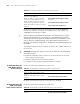
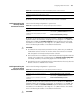
Using this command, you can configure the threshold value for the rate (per
second) of TCP/UDP connections based on one direction in a zone. According to
the above configuration, you can restrict the rate of connections to or from the
current zone. In other words, the system will export alarm log and deny the
subsequent connection requests without any alarm if the connection rate is
greater than the set threshold value. Once the zone-based statistics function is
enabled, the default value of the connection rate monitoring function takes effect
automatically.
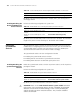
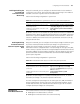
Perform the following configuration in zone view.
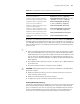
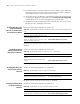
Tabl e 181 Enable/disable the zone-based statistics function
Operation Command
Enable the zone-based statistics function statistics enable zone { inzone | outzone }
Disable the zone-based statistics function
undo statistics enable zone { inzone |
outzone }
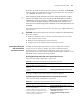
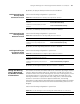
Tabl e 182 Enable/disable the zone-based connection count monitoring function
Operation Command
Enable the zone-based connection count
monitoring function
statistics connect-number { zone | ip } {
inzone | outzone } { tcp | udp } { high
high-limit low low-limit } [ acl acl-number ]
Disable the zone-based connection count
monitoring function
undo statistics connect-number { zone | ip
} { inzone | outzone } { tcp | udp } [ acl
acl-number ]