
3Com Switch 8800 Family Firewall Module Configuration and Command Reference Guide


184 CHAPTER 11: LOG MAINTENANCE
Clearing Log Execute the reset command in user view to clear the log buffer.
Log Configuration
Example
Outputting Attack
Prevention Log to Host
Network requirements
On the Firewall module, add GigabitEthernet 0/0.1, GigabitEthernet 0/0.2 and
GigabitEthernet 0/0.3 sub-interfaces to the trust zone, untrust zone and DMZ
respectively.
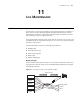
Network diagram
Refer to Figure 31.
Configuration procedures
Switch 8807 (SecBlade)
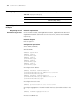
# Divide VLANs.
<SW8800> system-view
[SW8800] vlan 10
[3Com-vlan10] quit
[SW8800] vlan 30
[3Com-vlan30] quit
[SW8800] vlan 50
[3Com-vlan50] quit
[SW8800] vlan 60
[3Com-vlan60] quit
# Configure the IP address.
[SW8800] interface vlan-interface 10
[3Com-Vlan-interface10] ip address 10.0.0.254 24
[3Com-Vlan-interface10] quit
[SW8800] interface vlan-interface 30
[3Com-Vlan-interface30] ip address 30.0.0.1 24
[3Com-Vlan-interface30] quit
# Configure the static route.
[SW8800] ip route-static 0.0.0.0 0 30.0.0.254
# Configure aggregation of Firewall module interfaces (the module resides in slot
2).
[SW8800] secblade aggregation slot 2
# Create a SecBlade test.
Tabl e 200 Display and debug log
Operation Command
Clear the log buffer on the firewall
reset firewall log-buff { defend | session |
statistics | http | smtp }