
3Com Switch 8800 Family Firewall Module Configuration and Command Reference Guide
ASPF Configuration Commands 315
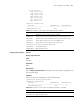
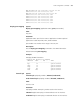
NBT datagram:192.168.4.255:138<--192.168.4.8:138
HTTP:192.168.4.1:80<--192.168.4.8:3396
NBT name:192.168.4.255:137<--192.168.4.8:137
HTTP:192.168.4.1:80<--192.168.4.8:3389
HTTP:192.168.4.1:80<--192.168.4.8:3398
HTTP:192.168.4.1:80<--192.168.4.8:3397
HTTP:192.168.4.1:80<--192.168.4.8:3393
HTTP:192.168.4.1:80<--192.168.4.8:3390
HTTP:192.168.4.1:80<--192.168.4.8:3395
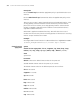
display port-mapping Syntax
display port-mapping [ application-name | port port-number ]
View
Any view
Parameter
application-name: Specifies the name of application for PAM. Optional
applications include FTP, HTTP, H323, SMTP and RTSP.
port-number: Port number in the range of 0 to 65,535.
Description
Use the display port-mapping command to view PAM information.
Related command: port-mapping.
Example
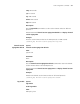
# Display all PAM information.
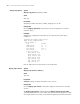
[SecBlade_FW] display port-mapping
SERVICE PORT ACL TYPE
-------------------------------------------------
ftp 21 system defined
smtp 25 system defined
http 80 system defined
rtsp 554 system defined
h323 1720 system defined
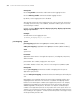
firewall aspf Syntax
firewall aspf aspf-policy-number { inbound | outbound }
undo firewall aspf aspf-policy-number { inbound | outbound }
View
Interface view
Parameter
aspf-policy-number: ASPF policy number used on the interface.
inbound: Applies ASPF policy in inbound direction of the interface.
outbound: Applies ASPF policy in outbound direction of the interface.