
H3C S7500 Series Ethernet Switches Release 3135 DHCP Configuration Examples

Routing Configuration Examples
H3C S7500 Series Ethernet Switches Release 3135 Chapter 1 Routing Overview
1-11
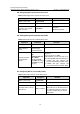
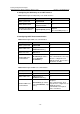
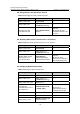
Operation Command Remarks
Create and configure a
virtual link
vlink-peer router-id
[ hello seconds |
retransmit seconds |
trans-delay seconds |
dead seconds | simple
password | md5 keyid
key ] *
Optional
For a virtual link to take
effect, you need to use this
command at both ends of the
virtual link and ensure
consistent configurations of
the hello, dead, and other
parameters at both ends.
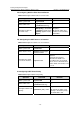
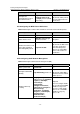
III. Configuring the Network Type of an OSPF Interface
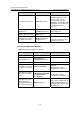
Table 1-22 Configure the network type of an OSPF interface
Operation Command Remarks
Enter system view
system-view
—
Enter interface view
interface interface-type
interface-number
—
Configure the network
type of the OSPF
interface
ospf network-type
{ broadcast | nbma |
p2mp [ unicast ] | p2p }
Optional
By default, the network
type of an interface
depends on the physical
interface.
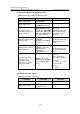
IV. Configuring an NBMA/P2MP Neighbor
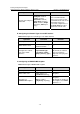
Table 1-23 Configure NBMA/P2MP neighbor
Operation Command Remarks
Enter system view
system-view
—
Enter OSPF view
ospf [ process-id
[ router-id router-id ] ]
Required
Configure an
NBMA/P2MP neighbor
peer ip-address
[ dr-priority dr-priority ]
Required
By default, the priority for
the neighbor of an NBMA
interface is 1.