
HP ProLiant BladeSystem p-Class System Maintenance and Service Guide

Connectors, LEDs, and Switches 100
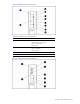
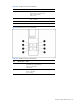
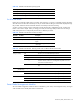
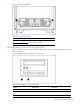
Table 4-39 HP BladeSystem 1U Power Supply LEDs
Condition Power LED (1) Fault LED (2)
Power supply fault condition
2
Off Amber
1
This condition will occur when the Dynamic Power Saver is enabled.
2
To reset the power supply fault condition warning, perform one of the following actions:
• Remove and reconnect AC power from the power enclosure.
• Remove and replace the power supply as a hot-plug procedure if more than one power supply is delivering power to the
server enclosure.
HP BladeSystem p-Class 3U Power Supply LEDs
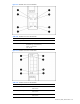
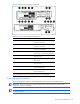
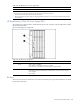
The hot-plug power supply has LEDs to indicate fault and power status. Use Figure 4-39 and Table 4-40 to identify
LED locations and functions.
Figure 4-39 Hot-plug power supply LEDs
Table 4-40 Hot-Plug Power Supply LEDs
Item LED Description Status
1 Power Green = Power is available.
Green flashing = Hot-plug power supply is in standby.
Off = No power is available, and/or hot-plug power supply has failed.
2 Fault Amber = Hot-plug power supply has failed.
Amber flashing = Current limit has been exceeded, and/or system has too few hot-plug
power supplies.
Off = Normal
Bus Bars
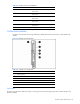
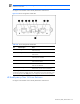
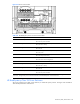
The bus bar has two LEDs to indicate DC power presence and polarity. Use Figure 4-40 and Table 4-41 to identify
LED locations and functions.