
HP ProLiant BladeSystem p-Class System Maintenance and Service Guide



Removal and Replacement Procedures 32
a. Remove power from the facility power connection.
b. Disconnect the PDU jumper cords from the power enclosure.
4. If the server blade enclosure is powered from a 3U power enclosure, remove power from the bus bar or power
bus box couplers (both A and B) connected to the server blade enclosure:
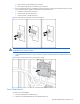
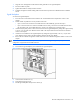
a. Unlock the circuit breakers switches (1).
b. Set the switches to the off position (2).
c. Lock the switches in the off position (3).
Figure 2-1 Setting the circuit breaker switch to the off position
WARNING! Always remove input power from the bus bars (both A and B) or the power bus boxes (both A
and B) before disconnecting the couplers.
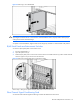
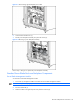
5. Disconnect both of the bus bar or the power bus box couplers (A and B) from the server blade enclosure rear
panel.
Figure 2-2 Disconnecting a bus bar or power bus box coupler
Server Blade Blanks
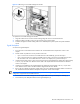
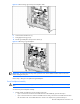
To remove a server blade blank:
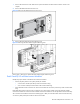
1. Press the release buttons simultaneously (1).
2. Slide the server blade blank from the server blade enclosure (2).