
HP ProLiant BladeSystem p-Class System Maintenance and Service Guide



Removal and Replacement Procedures 38
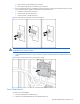
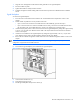
Figure 2-11 Disconnecting signal backplane power cable
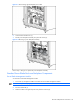
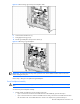
6. Loosen the three thumbscrews (1).
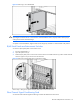
7. Pull the power backplane assembly away from the chassis (2).
Figure 2-12 Removing a power backplane assembly
Reverse steps 1 through 7 to replace the power backplane assembly.
Standard Server Blade Enclosure Backplane Components
Server Blade Management Module
To remove the server blade management module:
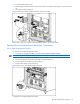
1. Disconnect any management cables connected to the server blade management module.
NOTE: This component is hot-plug capable.
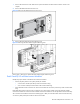
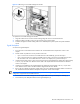
2. Press the release tab (1).
3. Slide the module to the right and pull it away from the enclosure (2).