
HP ProLiant BladeSystem p-Class System Maintenance and Service Guide


Removal and Replacement Procedures 41
2. Unseat the server blades from the power backplane assembly by sliding them approximately 2.54 cm (1 in) out
of the server blade enclosure. Refer to the documentation shipped with the server blades.
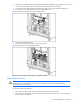
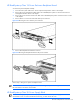
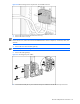
3. Disconnect the server blade management module signal cable from the power backplane assembly (1).
4. Disconnect the power backplane cable from the signal backplane (2).
Figure 2-16 Disconnecting signal and power backplane cables
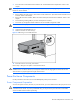
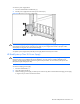
5. Loosen the three thumbscrews (1).
6. Pull the power backplane assembly away from the chassis (2).
Figure 2-17 Removing a power backplane assembly
Reverse steps 1 through 6 to replace the power backplane assembly.
Server Blade Enclosure
CAUTION: Electrostatic discharge can damage electronic components. Be sure you are properly grounded
before beginning any installation procedure. For more information, refer to the “Electrostatic Discharge
Information” section in this chapter..
To remove the server blade enclosure:
1. Remove all server blades. Refer to the documentation shipped with the server blades.
2. Remove all server blade blanks, if you are replacing the server blade enclosure. Refer to the “Server Blade
Blanks” section in this chapter.