
HP ProLiant BladeSystem p-Class System Maintenance and Service Guide


Removal and Replacement Procedures 44
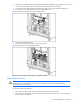
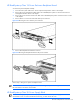
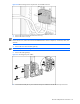
Figure 2-20 Removing an HP BladeSystem p-Class 1U Power Supply Blank
To replace a power supply blank, slide the power supply blank into the bay until it seats.
HP BladeSystem p-Class 1U Power Supply
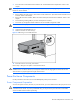
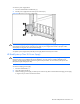
To remove a power supply:
1. Press the release buttons simultaneously.
2. Pull the power supply out of the enclosure.
Figure 2-21 Removing a 1U Power Supply
To replace a power supply, slide the power supply into the bay until it seats.
HP BladeSystem p-Class 1U Power Enclosure Power Management Module
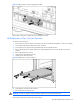
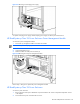
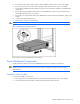
To remove a management module:
1. Disconnect any management cables connected to the module.
2. Loosen the thumbscrews (1).
3. Slide the module out of the power enclosure (2).