
HP ProLiant BladeSystem p-Class System Maintenance and Service Guide


Removal and Replacement Procedures 47
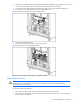
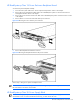
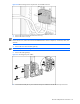
To remove a power supply blank:
1. Press the release buttons simultaneously (1).
2. Pull the power supply blank out of the power enclosure (2).
Figure 2-26 Removing a 3U power supply blank
CAUTION: Always populate power supply bays with either a hot-plug power supply or power supply blank.
Operating the enclosure without a hot-plug power supply or power supply blank results in improper airflow
and improper cooling that can lead to thermal damage..
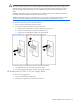
To replace a power supply blank, slide the power supply blank into the bay until it seats.
HP BladeSystem p-Class 3U Power Supply
CAUTION: To maintain a redundant power configuration, remove and replace one hot-plug power supply at a
time. If the system is not configured for power redundancy, you may choose to install a redundant power
supply to provide adequate system power during the service procedure. You can monitor system power with
HP Systems Insight Manager (HP SIM).
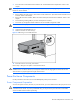
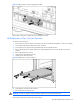
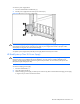
To remove a hot-plug power supply:
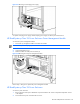
1. Press the release button (1).
2. Open the ejector handle (2)
3. Slide the hot-plug power supply out of the power enclosure (3). Place a hand under the hot-plug power supply
to support it as you remove it from the enclosure.