
HP ProLiant BladeSystem p-Class System Maintenance and Service Guide


Removal and Replacement Procedures 48
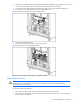
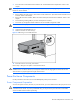
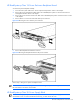
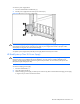
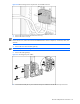
Figure 2-27 Removing a 3U hot-plug power supply
To replace a hot-plug power supply, slide the hot-plug power supply into the bay and close the lever.
HP BladeSystem p-Class 3U Power Enclosure Power Management Module
To remove the power management module:
1. Disconnect any management cables connected to the module.
NOTE: This component is hot-plug capable.
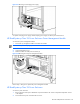
2. Loosen the thumbscrews (1).
3. Slide the module out of the power enclosure (2).
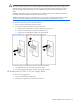
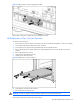
Figure 2-28 Removing the 3U power management module
Reverse steps 1 through 3 to replace the power management module.
HP BladeSystem p-Class 3U Power Enclosure
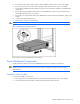
To remove a power enclosure:
1. Remove power from the power distribution components. Refer to the “Power Components Preparation” section
in this chapter.
2. Disconnect the AC power cords from the AC source.