
HP ProLiant BladeSystem p-Class System Maintenance and Service Guide




Diagnostic Tools 62
3 Diagnostic Tools
This chapter is an overview of software and firmware diagnostic tools that are available for configuring, monitoring,
and managing the system.
HP BladeSystem p-Class Diagnostic Tools
Use the following tools to diagnose problems, test hardware, and monitor and manage system operations.
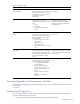
Table 3-1 Diagnostic Tools
Tool Description How to run the tool
Array Diagnostics Utility (ADU) ADU is designed to run on all HP
systems that support HP array controllers.
ADU collects information about the array
controllers in the system and generates a
list of detected problems.
For a list of HP systems that support
ADU, visit the HP website:
www.hp.com/support/files.html
For a complete list of ADU error
messages, refer to the HP ProLiant
Servers Troubleshooting Guide.
Automatic Server Recovery-2 (ASR-2) ASR-2 automatically restarts the server
blade after a catastrophic operating
system failure.
Available Recovery provides software
error recovery and environmental
recovery.
Unattended Recovery logs the error
information to the IML, resets the server
blade, and tries to restart the operating
system.
Run RBSU and set ASR-2 to enable this
tool.
HP Diagnostics tests and verifies
operation of HP hardware. If HP
Diagnostics finds a hardware failure, it
isolates the replaceable part, if possible.
Access HP Diagnostics when POST
detects a system configuration error. For
a complete list of POST error messages,
refer to the HP ProLiant Servers
Troubleshooting Guide. HP Diagnostics
can be downloaded from the HP
website:
www.hp.com/support/files
HP Systems Insight Manager (HP SIM) HP SIM is a client/server application
used to remotely manage HP hardware
in a network environment. HP SIM
reports hardware fault conditions (both
failure and pre-failure) and collects data
for reporting and graphing.
For more information on viewing and
printing the event list, refer to the HP
Systems Insight Manager User Guide or
the HP HP BladeSystem p-Class System
Setup and Installation Guide.
ROMPaq Utility The ROMPaq Utility checks the system
and provides a choice of available ROM
revisions and controller firmware.
You can download this utility from the
HP website:
www.hp.com
Survey Utility The Survey Utility gathers critical
hardware and software information on
server blades.
If a significant change occurs between
data-gathering intervals, the Survey
Utility marks the previous information
and overwrites the survey text files to
reflect the latest changes in the
configuration.
The Survey Utility is available on the HP
ProLiant Essential Rapid Deployment
Pack CD or on the HP website:
www.compaq.com/support/files/
servers/us/index.html