
HP ProLiant BladeSystem p-Class System Maintenance and Service Guide

Diagnostic Tools 65
Server Blade Management Module
This section describes diagnostic screens for the server blade management module.
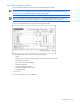
IMPORTANT: The screens in this section only provide information about the server blade enclosure to which
you are connected. To run diagnostics and access information about different server blade enclosures, you
must connect to the server blade management module on that enclosure.
NOTE: When accessing the infrastructure diagnostics on a powered module, the screen may be blank or it
may display information from the previous diagnostic cycle. Refresh the screen to see current data.
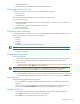
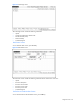
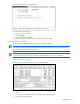
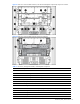
Figure 3-1 Server Blade Status screen (server blade management module)
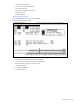
The Server Blade Status screen includes the following information:
• Uptime
• Blade location (slot #), status, power usage, fuse status, device ID, request counter
• Number of fault conditions
• Status of unit identification (UID) LED
• Status of enclosure link
• Enclosure backplane temperature
• Management module firmware version
• Command legend
Fault Screen
To view the Faults Page screen, press the F key.