
HP ProLiant BladeSystem p-Class System Maintenance and Service Guide

Diagnostic Tools 66
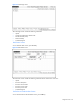
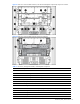
Figure 3-2 Faults Page screen
The Faults Page screen includes the following information:
• Uptime
• Location and description of fault codes
• Number of faults (count)
• Faults timestamp
• Command legend
Rack Status Screen
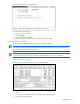
To view the Rack Status screen, press the S key.
Figure 3-3 Rack Status screen
The Rack Status screen includes the following information about all enclosures in the rack:
• Uptime
• Enclsoure description
• Enclsoure serial number
• Enclosure power usage
• Enclosure power zone
• Command legend
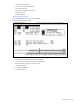
Set Enclosure Serial Number Screen
To view the Set Enclosure Serial Number screen, press the E key.