
HP ProLiant BladeSystem p-Class System Maintenance and Service Guide

Connectors, LEDs, and Switches 74
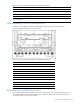
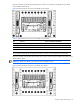
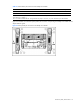
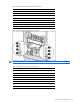
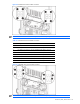
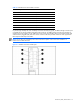
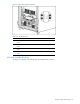
Table 4-5 Patch Panel RJ-45 Connectors for the BL40p Server Blades
Item Enclosure Enclosure with Enhanced Backplanes
Server Blade 1
B1 iLO 10/100T NIC Not used
1
B2 NC7781 10/100/1000T data NIC NC7781 10/100/1000T data NIC
B3 NC7781 10/100/1000T data NIC NC7781 10/100/1000T data NIC
A1 NC7781 10/100/1000T data NIC
2
NC7781 10/100/1000T data NIC
2
A2 NC7781 10/100/1000T data NIC NC7781 10/100/1000T data NIC
A3 NC7781 10/100/1000T data NIC NC7781 10/100/1000T data NIC
Server Blade 2
B4 iLO 10/100T NIC
Not used
1
B5 NC7781 10/100/1000T data NIC NC7781 10/100/1000T data NIC
B6 NC7781 10/100/1000T data NIC NC7781 10/100/1000T data NIC
1
ILO connections are made through the iLO port on the server blade management module.
2
This is the default enabled PXE NIC. Using the ROM setup utility on the server, any other data NIC may be PXE enabled.
A4 NC7781 10/100/1000T data NIC
2
NC7781 10/100/1000T data NIC
2
A5 NC7781 10/100/1000T data NIC NC7781 10/100/1000T data NIC
A6 NC7781 10/100/1000T data NIC NC7781 10/100/1000T data NIC
2
This is the default enabled PXE NIC. Using the ROM setup utility on the server, any other data NIC may be PXE enabled
GbE and GbE2 Interconnect Switches (Rear Panel)
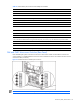
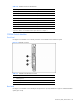
Each HP BladeSystem p-Class interconnect switch has an interconnect module with four Ethernet connectors for
network cabling. Two additional Ethernet connectors and a serial DB-9 connector are located on the front of each
interconnect switch (not shown).
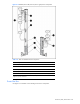
Figure 4-7 QuadT interconnect module RJ-45 connectors
NOTE: The QuadT interconnect module ships with the HP BladeSystem p-Class C-GbE Interconnect Kit.