
ProLiant BL25p Server Blade Maintenance and Service Guide



Removal and replacement procedures 13
2.
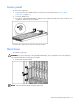
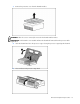
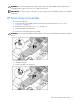
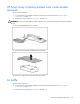
Install the hard drive.
3. Determine the status of the hard drive from the hot-plug hard drive LEDs ("Hot-plug SCSI hard drive
LEDs" on page 37).
Resume normal server operations.
To remove the component, reverse the installation procedure.
DIMMs
To remove the component:
1. Power down the server blade and remove it from the server blade enclosure ("Server blade
preparation" on page 11).
2. Remove the access panel ("Access panel" on page 12).
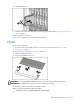
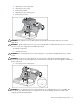
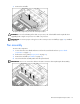
3. Open the DIMM slot latches.
4. Remove the DIMM from the slot.
CAUTION: Use only HP DIMMs. DIMMs from other sources may adversely affect data integrity.
IMPORTANT: For DIMM slots 1 and 2, remove the air baffle, if necessary.
To replace the component, reverse the removal procedure.
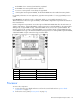
Observe the following DIMM installation guidelines:
• All DIMMs must be PC3200 DDR 400-MHz SDRAM DIMMs.