
ProLiant BL25p Server Blade Maintenance and Service Guide



Removal and replacement procedures 20
5.
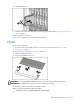
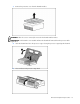
Press the fan retention tab and lift the assembly away from the system board.
To replace the component, reverse the removal procedure.
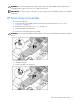
IMPORTANT: To ensure proper cooling, be sure the correct processor air baffle (on page 18) is installed
at all times.
Fibre Channel mezzanine (optional)
An optional FC mezzanine enables FC support (for clustering capabilities) and SAN connection when
used in conjunction with the RJ-45 Patch Panel 2 or the GbE2 Interconnect Switch with FC pass-through
option. The card is installed on top of the standard NIC mezzanine card.
To remove the component:
1. Power down the server blade and remove it from the server blade enclosure ("Server blade
preparation" on page 11).
2. Remove the access panel ("Access panel" on page 12).
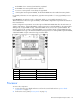
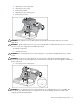
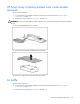
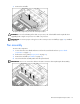
3. Loosen the thumbscrews.
4. Lift the FC mezzanine away from the system board.
To replace the component, reverse the removal procedure.