
ProLiant BL25p Server Blade Maintenance and Service Guide


Removal and replacement procedures 22
SCSI backplane
To remove the component:
1. Power down the server blade and remove it from the server blade enclosure. ("Server blade
preparation" on page 11)
2. Remove the access panel ("Access panel" on page 12).
3. Remove any hot-plug SCSI hard drives or hard drive blanks ("Hard drives" on page 12).
4. Remove the fan assembly ("Fan assembly" on page 19).
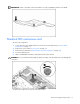
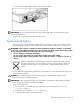
5. Disconnect the SCSI backplane power cable from the system board.
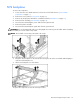
6. Remove the plastic air baffle.
7. Disconnect the SCSI backplane signal cable from the system board.
CAUTION: Be sure the LED board cable is not disengaged when removing the air baffle. When reinstalling
the air baffle, be sure the cable is fully seated.
NOTE: The air baffle is most easily removed at a 45° angle.
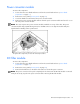
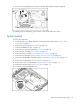
8. Grasp the SCSI backplane on the left side when facing the rear of the server blade and lift slightly to
rotate the SCSI backplane out.
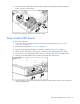
9. Lift the SCSI backplane out of the chassis.
To replace the component, reverse the removal procedure.